What is biometric authentication? Types, benefits and security

A customer opens an account with a selfie. Six months later, someone logs into that account with a fingerprint and sends a transfer. Those two checks look alike, but they are different controls answering different questions, and the gap between them is where account takeover usually happens.
Biometric verification establishes who a customer is when they sign up. Biometric authentication confirms that the person coming back is the one who enrolled. Treating them as the same thing weakens both.
This guide defines both terms, explains how biometric systems work, where they can be fooled, what standards and regulators expect, and how biometric data is treated under data protection law.
What is biometric authentication?
Biometric authentication is a security process that verifies a person's identity using their unique physical or behavioural traits instead of passwords or PINs.
In short, it confirms that a returning user is the person who originally enrolled. It compares a live trait, such as a face, fingerprint or voice, against a digital template stored when the account was set up.
It is the inherence factor in authentication: something you are, as opposed to something you know (a password) or something you have (a phone or token).
Most people use it every day without thinking about it: unlocking a phone or banking app with a face scan, or approving a payment with a fingerprint instead of typing a one-time password.
Every biometric authentication is a one-to-one match. The system already knows which account is being accessed, so the only question is whether the live sample matches the template linked to that account.
What is biometric verification?
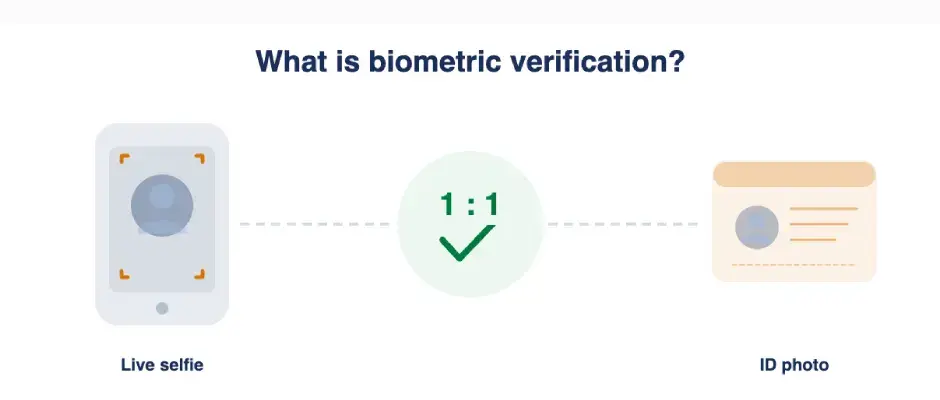
Biometric verification is a security process that confirms a person’s identity by comparing a live biometric sample against a previously stored reference record in a 1-to-1 matching process.
In remote onboarding, that usually means capturing a live selfie and comparing it with the photograph on the identity document the customer has presented.
It answers one question: is the person holding this document the person shown on it?
That makes it part of identity proofing, which in turn supports customer due diligence. It belongs to the Know Your Customer (KYC) process, not to the login process.
Document checks, liveness detection and database lookups usually sit alongside it; together they form what is often called eKYC or biometric KYC.

What is the difference between biometric verification, authentication and identification?
Three terms, three questions. Verification asks whether you are who you claim to be. Authentication asks whether you are the person who enrolled. Identification asks who you are at all.
Question it answers | Compared with | When it happens | Typical example | |
Verification | Are you who you claim to be? | Photo on an identity document | Onboarding, re-verification | Selfie matched to a passport |
Authentication | Are you the person who enrolled? | Template stored at enrolment | Login, payment approval | Face unlock on a banking app |
Identification | Who are you? | A database of many templates | Watchlist checks, law enforcement | Searching a gallery for a match |
Why the terms get mixed up
The practical difference between verification and authentication is what the live sample is compared against: a document the customer brought, or a template the firm already holds. Everyday usage blurs the two, and many vendor pages use “verification” and “authentication” interchangeably.
Some published definitions go further and describe biometric authentication as finding a person in a crowd. That is identification. Any process that searches many records is a one-to-many comparison, and it is not what a bank does when a customer logs in.

How does biometric authentication work?
Most biometric systems follow the same sequence. The flow below is an illustrative example, not a mandated procedure; vendors and use cases implement it differently.
Enrolment: The customer provides a biometric sample. The system converts it into a mathematical template rather than storing a photograph, and links the template to the account.
Capture: At the next login or approval, the system captures a fresh sample through a camera, sensor or microphone.
Liveness and presentation attack detection: The system checks that a live person is present rather than a photo, mask or replayed video.
Template creation: The new sample is converted into a template in the same format as the enrolled one.
Comparison: The two templates are compared, and the system produces a similarity score.
Threshold decision: The score is measured against a threshold set by the firm. Above it, the match passes; below it, the match fails.
Fallback: A failed attempt goes to an alternative route: another factor, a different biometric, or human review.
Why a biometric match is a probability, not a certainty
This is the part consumer explanations tend to leave out. No biometric system says “yes” with certainty. It produces a score that indicates how closely the live sample resembles the enrolled template, and the firm decides where to draw the line.
Two measures describe how a system performs:
False match rate (FMR): the proportion of attempts in which the system accepts someone who is not the enrolled person.
False non-match rate (FNMR): the proportion of attempts in which the system rejects the genuine enrolled person.
The two pull in opposite directions. A looser threshold means fewer genuine customers are rejected, but more impostors get through. A stricter threshold blocks more impostors but also locks out more real customers.
No setting eliminates both, which is why standards bodies treat biometrics as one factor among several rather than a single point of assurance.
Device biometrics vs server-side biometrics
These are two different controls, and confusing them is one of the most common causes of account takeover.
Device biometrics such as Face ID, Touch ID and Android fingerprint unlock confirm that a person enrolled on that device is present. The template never leaves the device, and the firm’s app or server typically only learns that the device unlocked successfully. The firm does not receive the biometric and cannot tell who enrolled it.
Standards bodies accept this model: a device unlock can act as the activation factor for a device-bound authenticator, which is how passkeys work. What it proves, however, is control of the device. It does not prove that the person is the customer who completed KYC.
Server-side biometrics compare the live sample against a template the firm holds, created at onboarding. That ties the session to the verified customer rather than to whoever controls the handset.
The difference shows up in a simple illustrative scenario. A fraudster gains control of a customer’s phone and enrols their own face on it. Device biometrics will now pass every time, because the fraudster is the enrolled device user.
A server-side check against the onboarding template would fail, because the fraudster is not the customer.

What are the types of biometric authentication?
There are 3 types of biometric authentication: physical, behavioural and multimodal biometrics. Each has strengths and weaknesses, and none can be reissued if compromised.
Physical biometrics
Face, fingerprint, iris and palm are what most people mean by “biometrics”.
Financial services rely on them because they are easy to capture, familiar to customers and well suited to remote channels, with face the dominant choice for anything done through a phone camera.
Behavioural biometrics
Behavioural biometrics measure how a person acts rather than what they look like: keystroke rhythm, mouse movement, how a device is held.
They add a risk signal that runs quietly in the background, which makes them useful for spotting an unusual session, but they are not a substitute for a verification or authentication check.
A separate guide will cover them in depth.
Multimodal biometrics
Multimodal systems combine two or more traits, such as face and voice, or face and behavioural signals. Combining modalities can lower error rates and make spoofing harder, because an attacker has to defeat more than one check.
The trade-off is cost, complexity and extra friction for the customer.
Type | What is measured | Typically used for | Main strength | Main weakness |
Face | Facial geometry and features | Onboarding, app login | Works with any camera; no extra hardware | Targeted by deepfakes and face swaps |
Fingerprint | Ridge patterns on a fingertip | Device unlock, payment approval | Fast and familiar to users | Needs a sensor; affected by damage or moisture |
Iris | Patterns in the coloured ring of the eye | High-security access, border control | Very low false match rates | Specialist hardware; limited consumer use |
Voice | Vocal tract and speech characteristics | Call centre authentication | Works over a phone line | Voice cloning; background noise and illness |
Palm or vein | Palm print or subsurface vein pattern | Branch and physical access | Hard to capture covertly | Dedicated hardware; little remote use |
Behavioural | Typing rhythm, swipe and device handling | Continuous background checks | Runs passively with no user friction | Needs a baseline; drifts over time |
Where is biometric authentication used in financial services?
Biometrics appear at several points in a regulated customer relationship, and each point has a different purpose.
Onboarding: biometric verification as part of identity verification and customer due diligence.
Login: biometric authentication replacing or strengthening a password.
Payment or high-risk action approval: a step-up check before a transfer, a limit change or a new beneficiary.
Account recovery: confirming identity when a customer loses a device or credentials.
KYC refresh: re-verification during periodic review or when account details change.
Biometric verification in KYC and remote onboarding
Remote digital customer onboarding has to achieve what a branch visit achieves without the branch. The customer presents a document, the firm checks if it's genuine, and a live selfie is matched against the photograph on it.
Done well, this catches the most common onboarding fraud: a stolen or forged document presented by someone who is not its holder.
Done badly, it catches little. A selfie match with no liveness check is defeated by a printed photo. The quality of this first step matters because everything afterwards depends on it.

Automated Identity Verification
Use liveness tests to verify identities and prevent ID fraud. Distinguish legitimate users from fraudsters to safeguard your business.
Biometric authentication after onboarding: logins, payments and step-up checks
After onboarding, the question changes from “who are you?” to “are you still the same person?”
Step-up authentication is the usual way to balance risk and friction: routine activity proceeds without interruption, and a biometric check is triggered only for actions that carry more risk.
The two stages are linked. If onboarding was weak, every later authentication confirms that the same unverified person has come back.
Strong authentication built on weak verification is a solid door in a flimsy frame.

Is biometric authentication safe?
Yes, Biometric authentication is stronger than passwords and SMS one-time passwords against phishing and credential theft, because there is no secret for a customer to be tricked into revealing.
It is not, however, a single point of trust, and it carries risks that passwords do not.
Benefits of biometric authentication
Resistant to phishing: there is no password to steal or type into a fake site.
Nothing to remember, forget or reuse across services.
Faster than entering a one-time password, which reduces drop-off at login and checkout.
Harder to share or delegate than a PIN, which makes it harder for a customer to deny a transaction.
Enables passwordless options such as passkeys, which bind authentication to a device.
Limits and risks
A compromised biometric cannot be reset. A new password can be issued; a new face cannot.
Matching is probabilistic, so some genuine customers will be rejected and some impostors will be accepted.
Accuracy varies with lighting, camera quality and across demographic groups, which raises fairness and accessibility questions.
Device biometrics confirm control of the device, not the identity of the customer.
A customer can be coerced into authenticating, which no biometric check can detect on its own.

AI-Powered ID Verification Solution
Discover how azakaw leverages AI to automate identity verification for a seamless onboarding process, while reducing fraud risk.
Can biometric authentication be fooled?
Yes. Every biometric system can be attacked, and each type of attack needs its own control. The most common mistake is to treat liveness detection as a defence against everything.
Attack | How it works | Control that addresses it |
Presentation attack | A photo, mask or screen replay held up to the camera | Presentation attack detection, including liveness detection, tested to a recognised standard |
Injection attack and deepfakes | Synthetic video fed directly into the data stream, bypassing the camera | Injection attack detection, device and session integrity checks, SDK hardening |
Voice cloning | AI-generated speech imitating an enrolled customer | Voice liveness checks, a second factor, never voice as a sole factor |
Stolen or leaked templates | Template data exposed through a breach | Encryption, template protection, minimal retention, no raw image storage |
Coerced or socially engineered customer | The genuine customer is pressured into authenticating | Transaction monitoring, behavioural signals, cooling-off periods on high-risk actions |
Account recovery bypass | Fraudster enrols their own biometric through a weak recovery route | Treat recovery as full re-verification, not a reset |
Presentation attacks and liveness detection
A presentation attack puts a spoof in front of the sensor: a printed photo, a mask, or a video playing on another screen. Presentation attack detection (PAD) is the family of techniques that counters this, and liveness detection is one of them.
Active liveness asks the user to do something, such as blink, turn their head or follow a prompt. Passive liveness analyses the captured image for signs of a live person without asking the user to do anything.
Passive checks give a smoother experience; active checks produce explicit evidence that the user intended to authenticate.
ISO/IEC 30107 is the international standard for presentation attack detection, and independent laboratory testing against it is the usual way to check a vendor’s claims.

Deepfakes and injection attacks
An injection attack bypasses the camera altogether. Instead of holding a deepfake up to the lens, the attacker feeds it straight into the application through a virtual camera or a tampered client.
Liveness detection works on the sample it receives. If an attacker injects a convincing deepfake after capture, a liveness check can pass it because, as far as the check can tell, a live face was presented.
Defending against injection needs different controls: device integrity checks, tamper detection in the SDK, and signals about how the session was established.
Face-swap and voice-cloning tools have made this far easier than it was a few years ago. The mechanics are covered in our guide to deepfakes and financial crime.

What do standards and regulators say about biometrics?
Standards bodies and regulators are more cautious about biometrics than vendor marketing suggests. The consistent message is that biometrics are one factor among several, not a complete answer on their own.
NIST and ISO: biometrics as one factor, with presentation attack detection
NIST Special Publication 800-63B-4 is a United States federal technical guideline on authentication. It is not law in any GCC country, but it is widely used as a benchmark, including by UAE regulators in their own guidance.
Its position is clear: biometrics may be used only as part of multi-factor authentication together with a physical authenticator, not as a single factor on their own. It also sets performance expectations for false match rates and expects presentation attack detection to be tested in accordance with ISO/IEC 30107-3.
ISO/IEC 2382-37 provides the standard vocabulary for biometrics. For a compliance team writing policy, using its terms consistently avoids the confusion between verification, authentication and identification described above.
FATF: digital identity in customer due diligence
The FATF Guidance on Digital Identity, published in March 2020, explains how digital identity systems, including those that use biometrics, can be used to identify and verify customers under Recommendation 10. It sets out how to assess the assurance level of a digital ID system and when reliance on it is appropriate.
FATF guidance is not national law: each country decides how to implement it, and the obligations a firm faces come from its own regulator.
UAE: digital identification guidance, enabling technologies and the move away from SMS OTPs
Two Central Bank of the UAE documents are relevant. The CBUAE Guidance for Licensed Financial Institutions on Digital Identification for Customer Due Diligence explains how digital ID systems can be used to meet CDD obligations.
The Guidelines for Financial Institutions Adopting Enabling Technologies, issued jointly by the CBUAE, SCA, DFSA and FSRA in November 2021, include a section on biometrics covering governance, identity proofing and enrolment, and ongoing monitoring of biometric applications.
Both are guidance written in “should” language. They set out what supervisors expect to see rather than imposing a legal requirement to use biometric verification or liveness detection.
On one-time passwords, trade press and vendors reported during 2025 that the CBUAE directed licensed financial institutions to stop using SMS and email OTPs for customer authentication by 31 March 2026, in favour of app-based, biometric or cryptographic methods.
The notice itself was not published in full, and reports differ on its scope and on fraud liability. The practical effect for most UAE customers was a shift to in-app approvals and biometrics.
Saudi Arabia and the other GCC states have their own regulators, data protection laws and digital identity schemes, and the UAE position should not be assumed to apply elsewhere in the region.
TIP: Read more about UAE AML compliance
How is biometric data protected under data protection law?
Most data protection regimes treat biometric data used to identify a person as sensitive personal data. That brings a higher bar for processing: a lawful basis such as explicit consent, stronger security, limits on retention and clear records of why the data is held.
In the UAE, Federal Decree-Law No. 45 of 2021 on the Protection of Personal Data treats biometric data as sensitive personal data. The DIFC and ADGM financial free zones each have their own data protection laws.
Saudi Arabia has its own Personal Data Protection Law. In the EU, the General Data Protection Regulation treats biometric data processed to identify a person as a special category.
Whichever regime applies, three practices follow:
Store templates rather than photographs, encrypt them, and keep them only as long as there is a reason to.
Minimise what is collected: do not retain the underlying image if the template is all the control needs.
Record the lawful basis and the consent obtained, because a supervisor will ask for it.
The reason for the higher bar is simple. A leaked password can be replaced. A leaked face cannot, and every extra copy held increases the exposure if a breach happens.

Seamless Multi-Jurisdiction Compliance
Effortlessly streamline onboarding, mitigate risks, and ensure compliance across multiple jurisdictions with an intuitive compliance tool designed specifically for asset and fund management complexities.
How to use biometrics in onboarding and compliance
Biometrics strengthen fraud and compliance controls only when they sit inside a layered design: good document checks, a clear fallback, monitoring after onboarding and records that explain each decision.
Before relying on a biometric control, a compliance team should be able to answer these questions:
What is the live sample compared against: an identity document, or a template the firm holds?
What are the false match and false non-match rates at the configured threshold?
Has presentation attack detection been independently tested against a recognised standard?
What defends against injection attacks, as distinct from presentation attacks?
What is the fallback when a check fails, and who reviews it?
Where are templates stored, in what form, and for how long?
What is the lawful basis, and how is consent recorded?
What audit trail exists for each decision, and would it stand up months later?
What due diligence has been done on the vendor?
In practice, the biometric engine is rarely the weak point. The gaps appear around it: a recovery route that skips re-verification, a fallback nobody owns, a template retained for years with no reason.
This is where a single platform helps.

End-to-End Compliance Tool
azakaw combines ID verification, biometric verification with face capture and recognition, liveness detection for remote identity verification and deepfake detection.
Frequently asked questions
Is biometric authentication the same as multi-factor authentication?
No. A biometric is one factor: the inherence factor, something you are. Multi-factor authentication requires at least two different types of factors, such as a biometric plus a registered device. Two biometrics are still one factor.
NIST SP 800-63B-4 accepts biometrics only as part of multi-factor authentication with a physical authenticator, not on their own.
What is the most secure biometric authentication method?
There is no single answer. Iris recognition has very low false match rates but needs specialist hardware, which rules it out for most remote use. Face recognition works on any phone but is the main target of deepfakes.
In practice, security depends on implementation: presentation attack detection, injection defences, threshold settings and what the biometric is paired with, more than on the trait itself.
What is the difference between biometric authentication and a passkey?
A passkey is a cryptographic credential stored on a device, following FIDO Alliance standards. The biometric does not travel anywhere; it unlocks the passkey on the device, and the passkey then proves control to the service. The biometric is the activation step; the passkey is what authenticates.
Is unlocking a banking app with Face ID the same as biometric verification for KYC?
No. Face ID confirms that the person enrolled on that device is present. It does not confirm that this person is the customer who completed KYC. Biometric verification at onboarding compares a live sample against the photograph on the customer’s identity document, which is a different check with a different purpose.
What happens if biometric data is stolen?
A fingerprint or face cannot be reissued, which is the central risk. Well-designed systems store encrypted templates rather than raw images and keep them only as long as needed, so a breached template is of limited use on its own.
Affected customers may need to re-enrol, and the firm should treat the breach as a notifiable incident under the applicable data protection law.
Is biometric verification mandatory for KYC?
Not as a standalone legal requirement. Regulators require firms to verify identity using reliable, independent sources, and biometric verification is one accepted way to do that in remote onboarding.
The exact requirements vary by country, regulator and licence type, so firms should check the applicable rules and seek advice where the position is unclear.
What happens when a biometric check fails?
A failed check is not evidence of fraud. Lighting, camera quality, an injury or an illness can all cause a genuine customer to fail.
A well-designed process routes failures to a fallback, such as a different biometric, additional documents or human review, and tracks repeated failures across customers so that patterns can be investigated.
Conclusion
Biometric matching is probabilistic, not definitive. Device biometrics and server-side biometrics are both useful controls that answer different questions. Liveness detection counters presentation attacks but not injection attacks. Biometric data cannot be reissued, which is why the law protects it more strictly.
Biometrics are a stronger defence than passwords and SMS codes against phishing and credential theft, but as standards bodies make clear, they are not a single point of assurance.
Anyone building or auditing a remote onboarding process should start with one question: what is the biometric compared against, and what sits around it?
Related articles
DISCLAIMER: This content is provided for general informational purposes and does not constitute legal or regulatory advice. Authentication, identity verification and data protection requirements vary by jurisdiction, business type and regulatory status. Organisations should consult the applicable legislation, regulator guidance and qualified legal or compliance professionals where necessary.
Sources
NIST SP 800-63B-4; ISO/IEC 30107 e 2382-37; FATF Guidance on Digital Identity (2020);
CBUAE Guidance on Digital Identification for CDD; Guidelines for Financial Institutions Adopting Enabling Technologies (CBUAE/SCA/DFSA/FSRA, novembro 2021);
Federal Decree-Law No. 45 of 2021;
GDPR.